Hello there, I have been attempting to remove any version of Omnissa Horizon Client on a machine, whether it is old or new. Whenever I try to remove it, PSADT will run through the motions and then I get a Windows Installer prompt like you do when running an executable or msi to find the switches such as this:
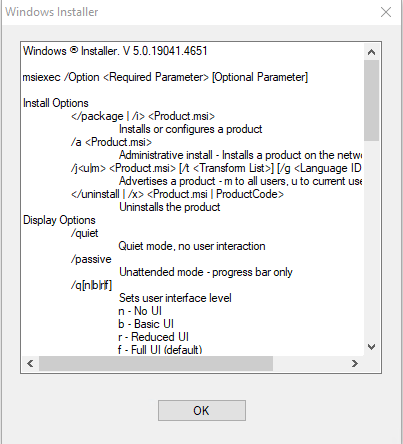
I am not sure why this is being triggered but here is a snippet of the log from the uninstall:

Here is more detail from the error after it executes the uninstall strings:
[Uninstall] :: Execution failed with exit code [1639]: Invalid command line argument. Consult the Windows Installer SDK for detailed command line help.
Error Record:
-------------

Message               : Execution failed with exit code [1639]: Invalid command line argument. Consult the Windows Installer SDK for detailed command line help.

FullyQualifiedErrorId : ProcessExitCodeError,Uninstall-ADTApplication
ScriptStackTrace      : at Start-ADTProcess<Process>, C:\WINDOWS\ccmcache\3c\PSAppDeployToolkit\PSAppDeployToolkit.psm1: line 22393
                        at Start-ADTMsiProcess<Process>, C:\WINDOWS\ccmcache\3c\PSAppDeployToolkit\PSAppDeployToolkit.psm1: line 20807
                        at Uninstall-ADTApplication<Process>, C:\WINDOWS\ccmcache\3c\PSAppDeployToolkit\PSAppDeployToolkit.psm1: line 24901
                        at Uninstall-ADTDeployment, C:\WINDOWS\ccmcache\3c\Invoke-AppDeployToolkit.ps1: line 277
                        at <ScriptBlock>, C:\WINDOWS\ccmcache\3c\Invoke-AppDeployToolkit.ps1: line 412
                        at <ScriptBlock>, <No file>: line 1

TargetObject          : Process     : System.Diagnostics.Process (msiexec)
                        LaunchInfo  : ProcessLaunchInfo { FilePath = C:\WINDOWS\system32\msiexec.exe, ArgumentList = System.Collections.ObjectModel.ReadOnlyCollection`1[System.String], WorkingDirectory = C:\WINDOWS\ccmcache\3c\Files, RunAsActiveUser = , UseLinkedAdminToken = False, UseHighestAvailableToken = False, InheritEnvironmentVariables = False, ExpandEnvironmentVariables = False, DenyUserTermination = False, InheritHandles = False, UseUnelevatedToken = False, UseShellExecute = False, Verb = , CreateNoWindow = False, WaitForChildProcesses = False, KillChildProcessesWithParent = False, StreamEncoding = System.Text.SBCSCodePageEncoding, WindowStyle = , ProcessWindowStyle = , PriorityClass = , CancellationToken = , NoTerminateOnTimeout = False }
                        CommandLine : "C:\WINDOWS\system32\msiexec.exe" /x {d223c13d-ad5d-4875-8fd1-6ef3b79f1274} /uninstall /silent /qn /L*V C:\WINDOWS\Logs\Software\OmnissaHorizonClient_8.16.0.31342_Uninstall.log
                        ExitCode    : 1639
                        StdOut      : {}
                        StdErr      : {}
                        Interleaved : {}

PositionMessage       : At C:\WINDOWS\ccmcache\3c\Invoke-AppDeployToolkit.ps1:277 char:9
                        +         Uninstall-ADTApplication -Name 'Omnissa Horizon Client'  -App ...
                        +         ~~~~~~~~~~~~~~~~~~~~~~~~~~~~~~~~~~~~~~~~~~~~~~~~~~~~~~~~~~~~~
In the uninstall section I have the following code:
 ## <Perform Uninstallation tasks here>
    $appName = Get-ADTApplication -Name 'Omnissa Horizon Client' -ApplicationType 'MSI' -FilterScript { $_.Publisher -match 'Omnissa, LLC' }

    if ($appName.count -gt 0) {
        Uninstall-ADTApplication -Name 'Omnissa Horizon Client'  -ApplicationType 'MSI' -ArgumentList '/qb /norestart REBOOT=ReallSuppress'
        }
            else {

        Write-ADTLogEntry -Message "$($adtSession.AppName) is not currently installed." -Severity 1
    }

    ## Remove any Existing version of VMWare Horizion Client

    $appName1 = Get-ADTApplication -Name 'VMWare Horizon Client' -ApplicationType 'MSI' -FilterScript { $_.Publisher -match 'VMWare, Inc.'}

    if ($appName1.count -gt 0) {
        Uninstall-ADTApplication -Name 'VMWare Horizon Client' -ApplicationType 'MSI' -ArgumentList '/qb /norestart REBOOT=ReallSuppress'

    }
        else {

            Write-ADTLogEntry -Message "$($adtSession.AppName) is not currently installed." -Severity 1
        }
Any help and guidance would be greatly appreciated.