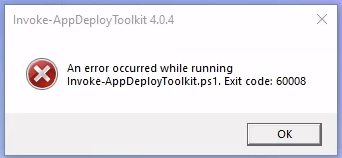
While testing Intune packages packaged with PSADT v4.0.4, it is observed that PSAppDeployToolkit module should be present to run packages from Intune. If the module is not imported before installation, toolkit fails with Exit Code: 60008.
This behavior is not observed in previous versions of toolkit. Whereas once module is imported, package works as expected even in v4.0.4.
Is this the expected behavior with V4 and is there any way out to handle this without module preferences. Could anyone please assist us with this process so we can proceed accordingly.
Previous versions, as in v3, had no PS modules.
I would look at the log file to make sure of the issue.
And BTW, latest version is v4.0.6
2 Likes
Please retry with 4.0.6 just to make sure - but if your deployment contains the module in the PSAppDeployToolkit folder as it should, Invoke-AppDeployToolkit.ps1 will import it from there. There is no need to pre-install the module.
I ran into this and a couple other issues quite a bit.
What I found for one issue was that it seems that PSADT V4 doesn’t seem to respect the confid.ps1d option to log in a different place while in non-admin mode, so for user based packages I just change both the admin and non-admin log locations in the config for that package.
Also, I did a bit if a re-write of the Initialization and Invocation blocks in invoke-appdeploytoolkit.ps1 to add in extra checks and an extra log of any errors that appear during initialization at ProgramData\PSADT_EarlyInit.log
This was extremely helpful in tracking down why it wouldn’t launch properly on the client in Intune, although it worked great in testing outside of intune.
##   This code block can replace the initialization and invocation sections of invoke-AppDeployToolkit.ps1 PSADT V4.0.6 to
##   add additional logging to the c:\ProgramData\PSADT_EarlyInit.log file in order to troubleshoot and capture errors from
##   the toolkit not loadingand launching the module properly

##================================================
## MARK: Initialization
##================================================

# Set strict error handling across entire operation.
$ErrorActionPreference = [System.Management.Automation.ActionPreference]::Stop
$ProgressPreference = [System.Management.Automation.ActionPreference]::SilentlyContinue
Set-StrictMode -Version 1

# Log file path for debugging any early failures
$global:EarlyLogPath = "$env:ProgramData\PSADT_EarlyInit.log"

# Make sure we can catch and log early errors
function Write-EarlyLog {
	param ([string]$Message)
	try {
		Add-Content -Path $global:EarlyLogPath -Value "$(Get-Date -Format 'yyyy-MM-dd HH:mm:ss') - $Message"
	}
 catch {
 }
}

# Start initialization
Write-EarlyLog "Starting initialization..."

# Unblock toolkit files just in case
try {
	Get-ChildItem -Path "$PSScriptRoot\PSAppDeployToolkit" -Recurse -File | Unblock-File -ErrorAction Ignore
	Write-EarlyLog "Unblocked toolkit files."
}
catch {
	Write-EarlyLog "Failed to unblock files: $_"
}

# Import the PSAppDeployToolkit module safely
try {
	$modulePath = "$PSScriptRoot\PSAppDeployToolkit\PSAppDeployToolkit.psd1"
	if (Test-Path $modulePath) {
		Import-Module -Name $modulePath -Force -ErrorAction Stop
		Write-EarlyLog "Imported PSAppDeployToolkit from $modulePath"
	}
	else {
		Import-Module -Name 'PSAppDeployToolkit' -Force -ErrorAction Stop
		Write-EarlyLog "Imported PSAppDeployToolkit from global path."
	}

	# Open ADT session
	try {
		$iadtParams = Get-ADTBoundParametersAndDefaultValues -Invocation $MyInvocation
		$adtSession = Open-ADTSession -SessionState $ExecutionContext.SessionState @adtSession @iadtParams -PassThru
		Write-EarlyLog "Opened ADT session successfully."
	}
	catch {
		Write-EarlyLog "Failed during Open-ADTSession: $($_.Exception.Message)"
		throw
	}

}
catch {
	Write-EarlyLog "Toolkit initialization failed: $($_.Exception.Message)"
	exit 60008
}


##================================================
## MARK: Invocation
##================================================

try {
	# Ensure PSAppDeployToolkit is loaded (fallback safety)
	Get-Item -Path "$PSScriptRoot\PSAppDeployToolkit.*" | ForEach-Object {
		Get-ChildItem -LiteralPath $_.FullName -Recurse -File | Unblock-File -ErrorAction Ignore
		Import-Module -Name $_.FullName -Force
	}

	# Call the proper deployment function (Install, Uninstall, Repair)
	& "$($adtSession.DeploymentType)-ADTDeployment"

	# Close the ADT session cleanly
	Close-ADTSession
}
catch {
	$mainErrorMessage = "Toolkit execution error: $($_.Exception.Message)"
	Write-EarlyLog $mainErrorMessage

	# You can also log to ADT if it's partially available
	try {
		Write-ADTLogEntry -Message $mainErrorMessage -Severity 3
	}
	catch {
		Write-EarlyLog "Write-ADTLogEntry failed: $($_.Exception.Message)"
	}

	# Skip Show-ADTDialogBox to avoid interaction issues
	Close-ADTSession -ExitCode 60001
}
finally {
	try {
		Remove-Module -Name PSAppDeployToolkit* -Force -ErrorAction Ignore
		Write-EarlyLog "Toolkit module removed from session."
	}
	catch {
		Write-EarlyLog "Failed to remove toolkit module: $($_.Exception.Message)"
	}
}
You could have just enabled global PowerShell transcription to get the same info:
You’ve raised a good point though, the executable should follow the config’s log path for its own early init log, I’ll get that done.
As a side note, the exe for 4.1.0 will have a /Debug switch that will allow to exe to bring up a console so you can see what’s going on.