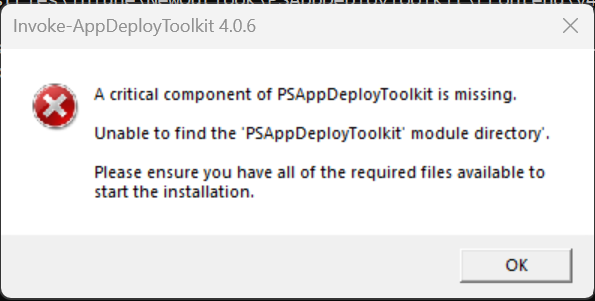
Is anyone else seeing this error? It’s my first time trying to use v4. I downloaded both “PSAppDeployToolkit.zip” and “PSAppDeployToolkit_Template_v4.zip” and they give me the same error. Here’s the error: A critical component of PSAppDeployToolkit is missing. Unable to find the ‘PSAppDeployToolkit’ module directory. Please ensure you have all hte required files available to start the installation.
Here’s the command I’m using to run the kit: .\ServiceUI.exe -Process:Explorer.exe Invoke-AppDeployToolkit.exe -DeploymentType ‘Install’
Have you extracted PSAppDeployToolkit_Template_v4.zip and left the filesystem layout exactly as it is? It seems as if the PSAppDeployToolkit folder has been moved or removed.
Correct, I extracted the template and left it as is. This is the filepath of the .exe btw: Q:\Software_Desktop_OS_and_Apps\Intune\PSAppDeployToolkit-v4\PSAppDeployToolkit\Frontend\v4
Which is different than the v3 path . Not sure if that makes a difference
You’re supposed to be running the exe from Q:\Software_Desktop_OS_and_Apps\Intune\PSAppDeployToolkit-v4, not deep within the module’s internals. This would effectively be the root of the PSAppDeployToolkit_Template_v4.zip file.
1 Like
Was there ever a fix for this? I copied the v4 template exactly as is, added the MSI file to the Files folder, didnt touch anything else in the entire file system, uploaded to PMPC and still getting the same failure error. Cant figure out what Im doing wrong. ONLY thing Ive changed/updated was putting the MSI file in the Files folder. The PS module is in the folder structure, I checked that it was there. So not sure what is missing or why its not loading. Any ideas of things I can try? Ive been testing a package and no matter what I do, I keep getting the same error.
which one of the files did you DL?