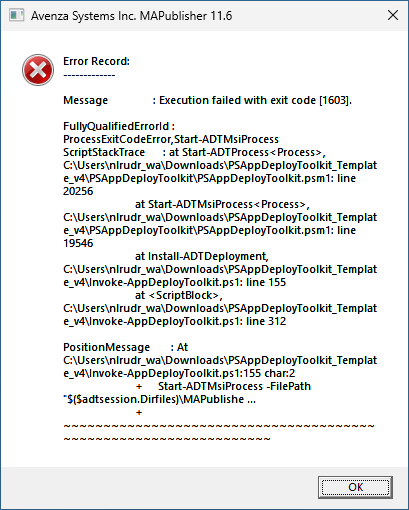
The MSI fails because a prerequisite is not installed and errors out with a 1603. I expected that the script would exit gracefully but it throwes me an error like this.
It’s because of your /QR switch for the MSI install.
You are telling MSI to install with a reduced UI. So MSI is showing this popup waiting for you to click the OK button and PSADT is waiting for MSI to finish.
PSADT has built-in default MSI settings in Config.psd1 that will not do this.
MSI (s) (CC:A8) [15:13:27:723]: Product: MAPublisher 11.6.0 -- Installation failed.
MSI (s) (CC:A8) [15:13:27:724]: Windows Installer installed the product. Product Name: MAPublisher 11.6.0. Product Version: 11.6.0. Product Language: 1033. Manufacturer: Avenza Systems Inc.. Installation success or error status: 1603.
MSI (s) (CC:A8) [15:13:27:747]: Deferring clean up of packages/files, if any exist
MSI (s) (CC:A8) [15:13:27:748]: MainEngineThread is returning 1603
MSI (s) (CC:48) [15:13:27:748]: Calling SRSetRestorePoint API. dwRestorePtType: 13, dwEventType: 103, llSequenceNumber: 221, szDescription: "".
MSI (s) (CC:48) [15:13:27:749]: The call to SRSetRestorePoint API succeeded. Returned status: 0.
=== Logging stopped: 17/04/2025  15:13:27 ===
MSI (s) (CC:48) [15:13:27:790]: User policy value 'DisableRollback' is 0
MSI (s) (CC:48) [15:13:27:790]: Machine policy value 'DisableRollback' is 0
MSI (s) (CC:48) [15:13:27:791]: Incrementing counter to disable shutdown. Counter after increment: 0
MSI (s) (CC:48) [15:13:27:791]: Note: 1: 1402 2: HKEY_LOCAL_MACHINE\Software\Microsoft\Windows\CurrentVersion\Installer\Rollback\Scripts 3: 2
MSI (s) (CC:48) [15:13:27:793]: Note: 1: 1402 2: HKEY_LOCAL_MACHINE\Software\Microsoft\Windows\CurrentVersion\Installer\Rollback\Scripts 3: 2
MSI (s) (CC:48) [15:13:27:793]: Decrementing counter to disable shutdown. If counter >= 0, shutdown will be denied.  Counter after decrement: -1
MSI (s) (CC:48) [15:13:27:794]: Destroying RemoteAPI object.
MSI (s) (CC:B0) [15:13:27:794]: Custom Action Manager thread ending.
MSI (c) (00:20) [15:13:27:797]: Decrementing counter to disable shutdown. If counter >= 0, shutdown will be denied.  Counter after decrement: -1
MSI (c) (00:20) [15:13:27:798]: MainEngineThread is returning 1603
=== Verbose logging stopped: 17/04/2025  15:13:27 ===
  # Installation parameters used for silent MSI actions.

   # SilentParams = 'ALLUSERS=1 REBOOT=ReallySuppress REBOOTPROMPT=Suppress ROOTDRIVE=C:\ /QN'

   SilentParams = 'ALLUSERS=2 MSIINSTALLPERUSER=1 REBOOT=ReallySuppress REBOOTPROMPT=Suppress ROOTDRIVE=C:\ /QN'


   # Installation parameters used for MSI uninstall actions.

   # UninstallParams = 'ALLUSERS=1 REBOOT=ReallySuppress REBOOTPROMPT=Suppress ROOTDRIVE=C:\ /QN'
you have to look at the log more closely, 1603 should bring better information
   UninstallParams = 'ALLUSERS=2 MSIINSTALLPERUSER=1 REBOOT=ReallySuppress REBOOTPROMPT=Suppress ROOTDRIVE=C:\ /QN'


   # Registry key used to store toolkit information (with PSAppDeployToolkit as child registry key), e.g. deferral history.

   RegPath = 'HKCU:\SOFTWARE'


   # Specify if Administrator Rights are required. Note: Some functions won't work if this is set to false, such as deferral, block execution, file & registry RW access and potentially logging.

   # RequireAdmin = $true

   RequireAdmin = $false
We are aware of the parameters to use and the parameters you use are not all usable within our organization. I made myself a test MSI file with just one little text file in it, ALLUSERS=1 property in it and a requirement for “Microsoft Project 2007 Primary Interop Assembly”. That won’t be present on most machines so when installed it will fail because it cannot find the prerequisite.
With this MSI I get the same results with a Vanilla PSADT template. With 3.10.2 it works flawless and with 4.0.6 I get the error message thrown like beneath.
I attached a zip file in my mail reply with the two tests (3.10.2/4.0.6) in it. I don’t know what I am doing wrong here.
But maybe the zip is not coming through in this post I see. Anywhere I can add the file?
Hi!
Thanks for that, marking out that line gives me exactly what I want. The script doesn’t bother the user with overloads of error messages. i completely overlooked this line.
Great, solved for me.
Thanks again.
The fact that it says this makes me think you specified 'C:\WINDOWS\ccmcache\2d\$($adtSession.DirFiles)\ABC.txt' on the command line and not "C:\WINDOWS\ccmcache\2d\$($adtSession.DirFiles)\ABC.txt" (noting the use of double quotes in the latter, which allows variable expansion).


 :
: