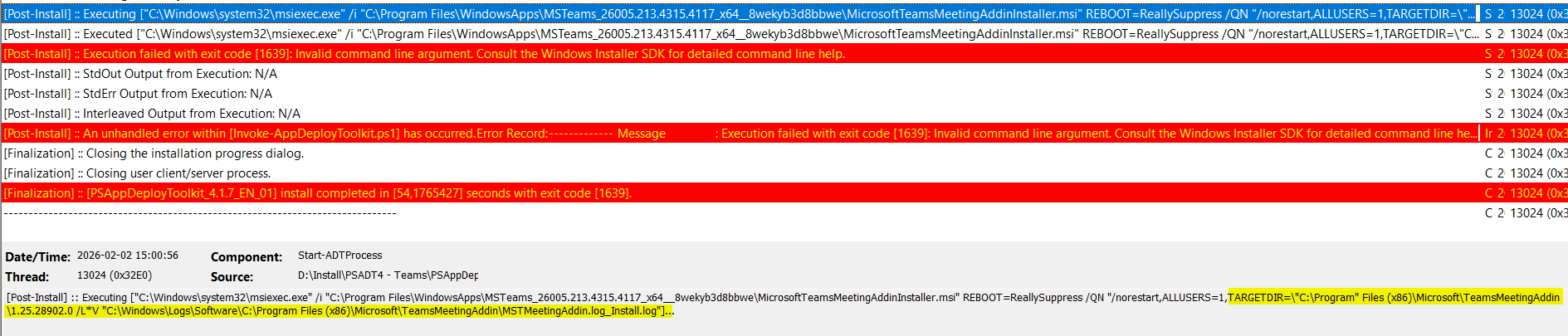
I recently posted a question regarding the new Teams and how to get it installed. As part of that installation I need to install/update the meeting add-in for Microsoft Office. I have the commands working in PS - taken from a working script. How would this look in PSADT syntax?
IMHO your variables should be written within $() to ensure that any spaces in the path are expanded correctly, and the use of double quotes should be simplified.
This is how it 'should ' probably look - Note the escaped double quotes using the ` character
But you are right, using Start-ADTMsiProcess would be a much better route to achieve this as it is the Native PSADT method, reviewing the reference page here:
Your screen grab shows you may still using the Start-Process "msiexec"... command, I suggest you use the Start-ADTMsiProcess -Action 'Install'... command instead and we can then advise as this is the native PSADT command
N.B. I have amended my Start-ADTMsiProcess command above as I missed the -ArgumentList "/QN" and I have also corrected the quotes around the various -AdditionalArgumentList entries
OK, I think you'll need to work on that
TIP: PSADT logs to a default folder (This is defined in the config.psd1 file)
You need to review the Logging Options to decide what you need:
and LogFileName to define this correctly:
TIP: LogFileName is just that - Not the full path as I'd incorrectly supplied
I'll have a look. Actually it's the log file for the add-in so should not need the LogginOptions or the -LogFileName I guess. the options /L*V should take care of it. Anyways, thanks for the support.