M_Anon
April 25, 2025, 4:20am
1
One of our apps is a simple, single exe that I am planning on copying to C:\Program Files but Copy-ADTFile can’t “find” it?
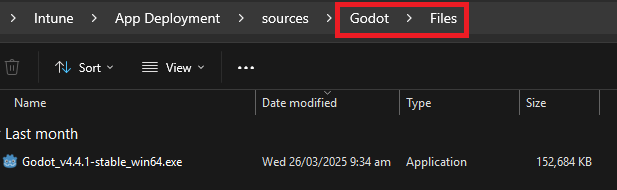
The file is definitely there:
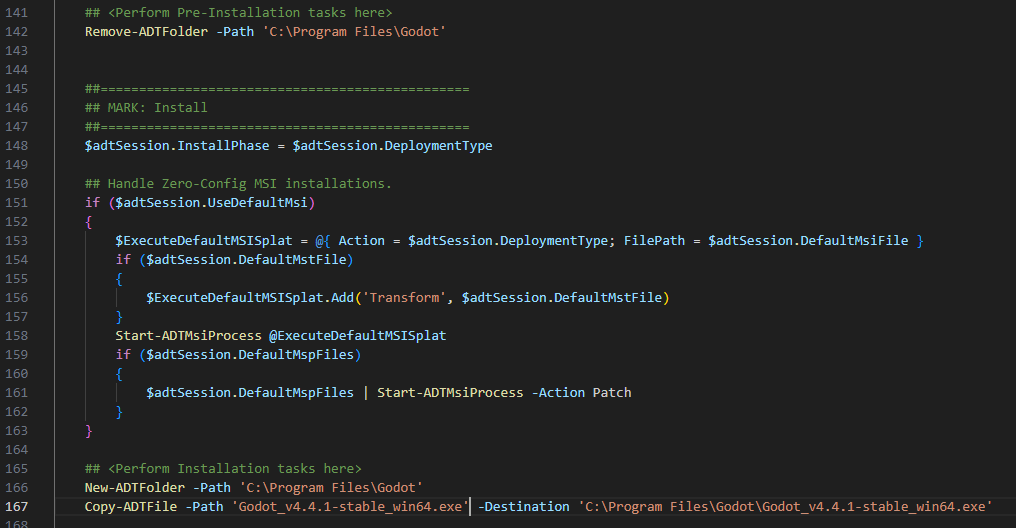
But when I do a Copy-ADTFile:
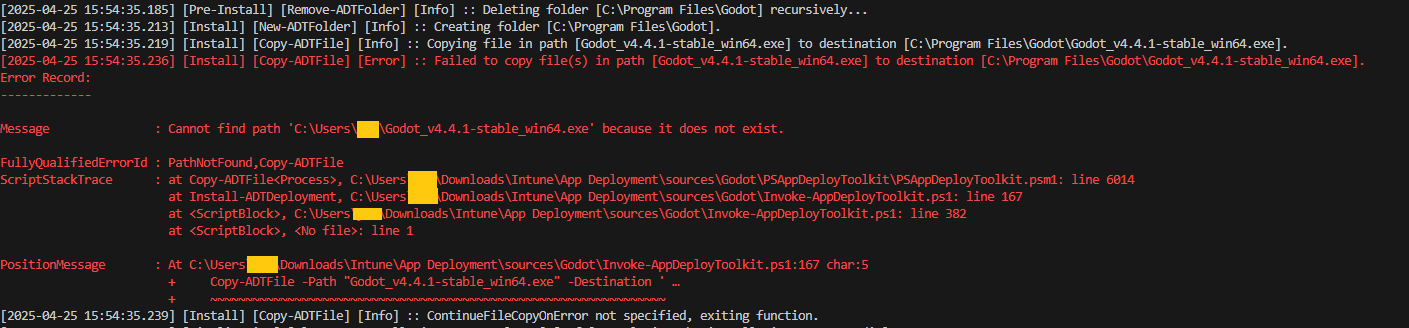
It errors out saying it can’t find the file:
I don’t understand why it’s looking under my home folder C:\Users\xxx. I tried using the $adtSession.DirFiles but it simply just looks at C:\Users\xxx$adtSession.DirFiles which is also incorrect.
Anyone encountered this before?
Maybe use this:
Copy-ADTFile -Path "$($adtsession.dirfiles)\Godot_v4.4.1-stable_win64.exe" -Destination <Your destination folder>
If you do that make sure to use double quotes instead of single (single quotes in powershell are a literal string).
M_Anon
April 25, 2025, 11:35pm
3
I swear I did that yesterday but it didn’t work. Tried again today and it does …
Oh well, thanks!
1 Like
system
May 2, 2025, 11:35pm
4
This topic was automatically closed 7 days after the last reply. New replies are no longer allowed.