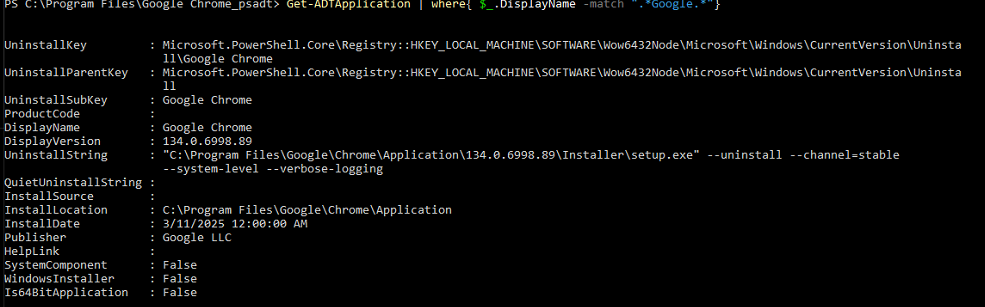
Hello,
Anyone can help me with the command to uninstall Google chrome (EXE) silently ?
I already tried this:
Uninstall-ADTApplication -Name 'Google Chrome' -ApplicationType 'EXE' -ArgumentList "--uninstall --channel=stable --system-level"
Uninstall-ADTApplication -Name 'Google Chrome' -ApplicationType 'EXE' -ArgumentList "/QN"
$previouschrome = (Get-ADTApplication -Name 'Google Chrome')
if ($previouschrome -ne $null){
 Uninstall-ADTApplication -InstalledApplication $previouschrome -ArgumentList '/QN /noreboot'}
You can’t just tack on msiexec.exe arguments and hope for the best. Since there’s no QuietUninstallString, you’ll have to determine the exact silent arguments it needs for your -ArgumentList parameter.
yes, you are right.
I’ve tried a lot of ArgumentList, this way i came here to see if anyone already faced it.
From reading this:
I suspect you need to append --force-uninstall on the end of your arguments, so by retrieving the actual uninstall command held in the registry your uninstall command should look something like this (N.B. This is untested):
$previouschrome = (Get-ADTApplication -Name 'Google Chrome')
if ($previouschrome -ne $null){
    $UninstallString = $($previouschrome).UninstallString
    $ArgumentsString = "$(($UninstallString).Split("`"")[2]) --force-uninstall"
    Uninstall-ADTApplication -InstalledApplication $previouschrome -ApplicationType 'EXE' -ArgumentList $ArgumentsString
}
Sorry for the late reply.
It does not work
Thank you anyway
--uninstall --system-level --verbose-logging --force-uninstall
try the above parameters to the setup.exe.
Thank you, It works perfectly