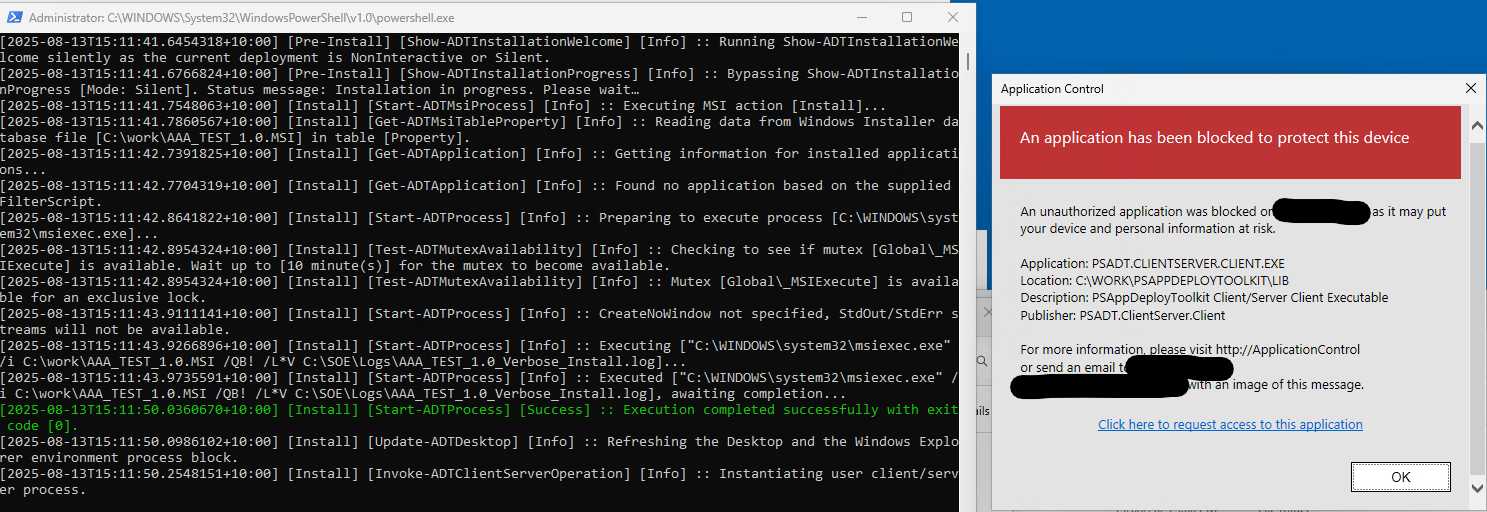
Hello, I'm testing out the 4.1.0 update and during the Update-ADTDesktop function it appears to try to launch in user context and gets blocked by our Ivanti App Control agent, I am testing from the local system account to simulate installing from SCCM.
Is there anyway to force or configure Update-ADTDesktop to run as per previous versions of ADT which have not been blocked so that it doesn't run in user context or require elevation?
This functionality always has to occur in the user's context. Before with ServiceUI, despite running as SYSTEM, you were in the user's session which is what allowed it to work.
Please permit all PSADT*.dll and PSADT*.exe binaries within Ivanti. They're safe and are digitally signed by Patch My PC.