Sanity check please,
I have an exe install that I scripted and successfully tested. Went thru the steps to import the script into an Intune Win32 App. Seems to get to 100% then errors with a “fail to install”. Error Install error - 0x80070001. This is on Microsoft has very little to offer, and none of it appears to revolve around Intune.
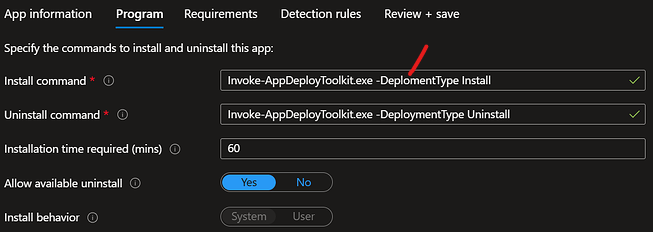
The Command ran is Invoke-AppDeployToolkit.exe -DeplomentType Install. That command works fine on the test machine using the PSADT script manually. But I am wondering if I am missing something with security.
I have converted my script to Intune twice. Uploaded the package to Intune 4 times (twice failed in the middle of upload), and ran through the steps to resolve this error found here
I am new in this tenant space, and there are challenges. However, also new to PSADT 4.x, and wanted to ensure I am not missing something while I go cry to the Microsoft guys.
TIA
Reviewing the link you sent and a separate search I have done, it appears this is often caused by a lack of available disk space or an unreliable internet connection.
Uploaded the package to Intune 4 times (twice failed in the middle of upload)
This gives me the impression your internet connection may not be that reliable 
What is the app you are trying to deploy?
How big is it?
Are you deploying the App in the Users Context or in the System Context:
Have you tweaked the timeout settings on the app to cater for it’s size / installation time?
What is the Install (and Uninstall) Command Lines you have configured in your PSADT script?
What is the Install (and Uninstall) command line configured in the Intune Portal?
What is the detection rule you have configured?
Have you tried making the App as an available app in the Company Portal and then manually trying to test the install from there?
Sorry so many questions, but this sounds like there is lots that could be the cause
I would agree about my connection initially. But this is the 2nd app I have built where I had the upload issue at 2 different locations using different ISP’s.
This package installs Cisco DUO 5.0 from the install executable with configuration switches.
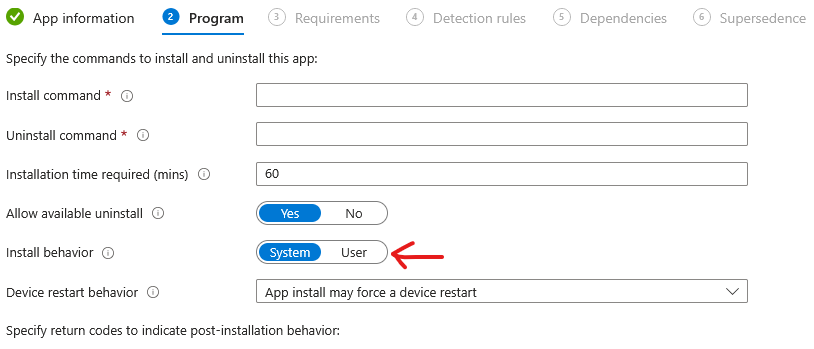
Here is my app setup to install.
My Detection rules are the MSI Product Key, and Registry compare.
I recall once there was somewhere on the local device where Intune Cached the setup files, but Im not finding it atm. I see the download complete from Company Portal, but it failed to execute the script on 2 devices (physical and hyper-V).
The command line in the script (that works manually) is
Start-ADTProcess -FilePath 'duo-win-login-5.0.0.exe' -ArgumentList '/S /V" /qn IKEY="<CompanyKey>" SKEY="<SecretKey>" HOST="<URL>" AUTOPUSH="#1" FAILOPEN="#0" SMARTCARD="#1" RDPONLY="#0"'
Thus far, I have only built Win32 apps using PSADT 4 to run MSI and File copy installs for this client. This is the 1st EXE installation for this environment.
Thanks again!
Does the <CompanyKey> or <SecretKey> contain Single ’ or Double quotes " ?
What about back-ticks ` or commas , ?
Here’s the 1st error:
Should be
DeploymentType (not
DeplomentType)
I’d try changing that first, and if that doesn’t fix it, I’d revisit your scripts command line as I’m not certain the install command line in your script is entirely correct as you have a mix of single and double quotes without certain quotes escaped - so this may be part of the issue
Currently:
Start-ADTProcess -FilePath 'duo-win-login-5.0.0.exe' -ArgumentList '/S /V" /qn IKEY="<CompanyKey>" SKEY="<SecretKey>" HOST="<URL>" AUTOPUSH="#1" FAILOPEN="#0" SMARTCARD="#1" RDPONLY="#0"'
Let’s take the -ArgumentsList, you open a single quote before /S then open a double quote after /V then have multiple parameters with the values in a pair of double quotes, you then close the whole string with a single quote.
I suspect you may either need to escape the double quotes after the /V and then add an additonal escaped double quote before the final single quote - like this:
Start-ADTProcess -FilePath 'duo-win-login-5.0.0.exe' -ArgumentList '/S /V`" /qn IKEY="<CompanyKey>" SKEY="<SecretKey>" HOST="<URL>" AUTOPUSH="#1" FAILOPEN="#0" SMARTCARD="#1" RDPONLY="#0"`"'
or you may need to escape each parameter value 
Start-ADTProcess -FilePath 'duo-win-login-5.0.0.exe' -ArgumentList '/S /V" /qn IKEY=`"<CompanyKey>`" SKEY=`"<SecretKey>`" HOST=`"<URL>`" AUTOPUSH=`"#1`" FAILOPEN=`"#0`" SMARTCARD=`"#1`" RDPONLY=`"#0`"'
Let us know how you get on (apologies, I’m unlikely to respond now for a day or so)
The script itself works fine. I can run Invoke-AppDeployToolkit.exe from a command prompt and the script installs (and uninstalls) without issue.
The Company Portal shows the app downloading to 100% before showing the install failed, with the mentioned error code in Intune.
Well color me stoopid. 
Thank you for showing the way! 
Ha! No worries, Glad to have helped