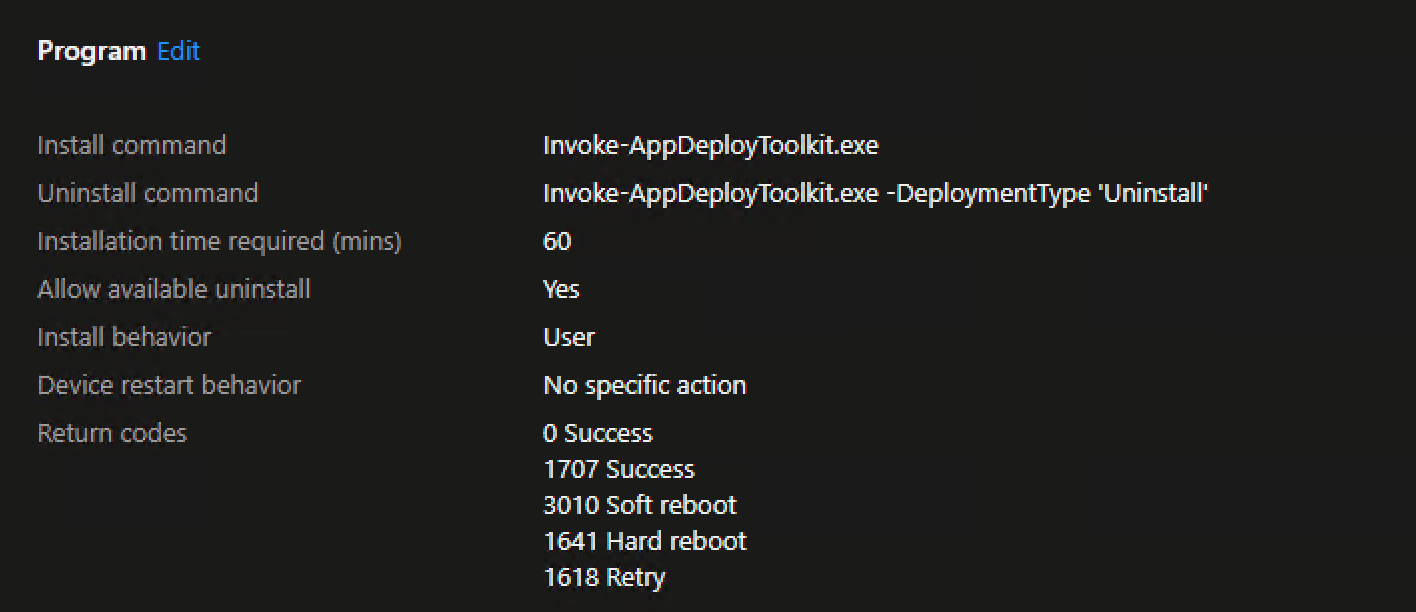
I have been working to get used to using v4 of PSADT and have one area that I haven’t been able to figure out quite yet how to push an Edge Extension through Intune. The documentation makes it look quite simple, compared to some of the crazy stuff I saw out there on SilentInstallHQ.
Right now, I am just testing this out with uBlock Origin for the time being, but have a few others lined up that I wouldn’t mind switching over to PSADT.
Yes, on the Intune side, I am setting the Install behavior as ‘User’ for deployment, which I thought would do the trick, but it seems to fail every time.
Also, the detection side of the deployment is this Powershell script, which just looks for that extension folder in the the user’s local app data:
# Define the extension ID
$extensionId = "odfafepnkmbhccpbejgmiehpchacaeak"

# Define the path to the Edge extensions directory
$extensionsPath = "%LOCALAPPDATA%\Microsoft\Edge\User Data\Default\Extensions"

# Check if the extension directory exists
if (Test-Path "$extensionsPath\$extensionId") {
    Write-Output "Extension is installed"
    exit 0
} else {
    Write-Output "Extension is not installed"
    exit 1
}
That part isn’t as important, since that is just used post-install, which I haven’t gotten to just yet.
For that Powershell detection script, that part is done outside of PSADT, so the environment variables are outside of the normal PSADT ones, so I just use the standard Windows variables for that piece.
For the only example I can find, the person is using v3, and it looks like quite a bit of work with the install and registry key additions, and I am just not sure if it is needed with the extra capabilities of v4 (at least, I hope not!)
Here’s that code I found though -
If ($deploymentType -ine 'Uninstall' -and $deploymentType -ine 'Repair') {
##*===============================================
##* PRE-INSTALLATION
##*===============================================
[string]$installPhase = 'Pre-Installation'
## Show Welcome Message, Close Microsoft Edge With a 60 Second Countdown Before Automatically Closing
Show-InstallationWelcome -CloseApps 'msedge' -CloseAppsCountdown 60
## Show Progress Message (With a Message to Indicate the Microsoft Edge Extension that is Being Installed)
Show-InstallationProgress -StatusMessage "Installing the $installTitle. Please Wait..."
##*===============================================
##* INSTALLATION
##*===============================================
[string]$installPhase = 'Installation'
## Function to Enumerate Registry Values
Function Get-RegistryValues {
param(
[Parameter(Mandatory=$True)]
[string]$Path
)
Push-Location
Set-Location -Path $Path
Get-Item . | Select-Object -ExpandProperty property | ForEach-Object {
New-Object PSObject -Property @{"Property"=$_;"Value" = (Get-ItemProperty -Path . -Name $_).$_}
}
Pop-Location
}
## ExtensionInstallForcelist Registry Path
$RegistryPath = "HKLM:\SOFTWARE\Policies\Microsoft\Edge\ExtensionInstallForcelist"
$KeyType = "String"
## Qwant Microsoft Edge Extension
$ExtensionID = "eljplgljphmgjhnalbganhenlcapgnne;https://edge.microsoft.com/extensionwebstorebase/v1/crx"
## Create Registry Path If Not Present
If (!(Test-Path -Path $RegistryPath)) {
Write-Log -Message "Creating ExtensionInstallForcelist Registry Key."
Try {
New-Item -Path $RegistryPath -Force
}
Catch {
Write-Log -Message "Failed to Create ExtensionInstallForcelist Registry Key."
}
}
## Loop Through Existing Registry Properties & Values
$ExtensionProperties = Get-RegistryValues -Path $RegistryPath | Select-Object Property
$ExtensionValues = Get-RegistryValues -Path $RegistryPath | Select-Object Value
## Assume the List of Forced Extensions Will Never Exceed a Count of 50
$Values = 1..50
## No Registry Key Properties Found, Continue to Next Step
If ($ExtensionProperties -ne $null) {
## Find Next Available Number for Use in KeyName
$NextNumber = Compare-Object $ExtensionProperties.Property $Values | Select-Object -First 1
$KeyName = $NextNumber.InputObject
## Check if Qwant Microsoft Edge Extension is Already Installed
If ($ExtensionValues -match $ExtensionID) {
Write-Log -Message "The $ExtensionID Extension is Already Installed."
}
## Add the Qwant Microsoft Edge Extension
Else {
Write-Log -Message "The $ExtensionID Extension Was Not Found. Adding the Extension Now."
Try {
New-ItemProperty -Path $RegistryPath -Name $KeyName -PropertyType $KeyType -Value $ExtensionID
}
Catch {
Write-Log -Message "Failed to Add the $ExtensionID Extension."
}
}
}
## Add the Qwant Microsoft Edge Extension as the First Extension
Else {
Write-Log -Message "Adding the $ExtensionID Extension as the First Extension."
Try {
New-ItemProperty -Path $RegistryPath -Name 1 -PropertyType $KeyType -Value $ExtensionID
}
Catch {
Write-Log -Message "Failed to Add the $ExtensionID Extension as the First Extension."
}
}
# Define the extension ID
$extensionId = "odfafepnkmbhccpbejgmiehpchacaeak"
# Define the path to the Edge extensions directory
$extensionsPath = "$($env:LOCALAPPDATA)\Microsoft\Edge\User Data\Default\Extensions"
# Check if the extension directory exists
if (Test-Path "$extensionsPath\$extensionId") {
Write-Output "Extension is installed"
exit 0
} else {
Write-Output "Extension is not installed"
exit 1
}
Hope this helps someone else out. I think I was just trying to many different things and changing the detection scripts while also not wiping out the previous failed detection regkeys/GRS keys, since I set this as a required install. I recommend just setting apps to “Available” so that you can at least force a re-install and try again.
Well done
Yep, retrying Intune App deployments has a specific course of action.
Rudy Ooms is one of the go to experts in the field and his article here is a great resource explaining the How to: