Just downloaded v4.1 to make use of creating an app deployment in Intune with a user msg to close out specific apps. When I run my script locally with no apps specified for AppProcessesToClose, the app install runs. Once I add my comma seperated list of apps, the script fails. Are there any code examples for the new $adtSession variables to I can figure out what I'm not formatting correctly?
When you say things like "the script fails", we really need to see what failure you're getting. Right now there's nothing we can do without all the information.
 ##================================================
    ## MARK: Pre-Install
    ##================================================
    $adtSession.InstallPhase = "Pre-$($adtSession.DeploymentType)"

    ## Show Welcome Message, close processes if specified, allow up to 3 deferrals, verify there is enough disk space to complete the install, and persist the prompt.
    $saiwParams = @{
        AllowDefer = $false
        DeferTimes = 0
        CheckDiskSpace = $false
        PersistPrompt = $true
    }
    if ($adtSession.AppProcessesToClose.Count -gt 0)
    {
        $saiwParams.Add('CloseProcesses', $adtSession.AppProcessesToClose)
    }
    Show-ADTInstallationWelcome @saiwParams

    ## Show Progress Message (with the default message).
    Show-ADTInstallationProgress

    ## <Perform Pre-Installation tasks here>
Here is the error I am receiving:
[2025-08-19T12:57:30.5609707-06:00] [Finalization] [Close-ADTSession] [Error] :: Failure occurred while closing ADTSession for [{Engagement24.2.1}]. Exception calling "Close" with "0" argument(s): "Input string was not in a correct format. Failure to parse near offset 2. Expected an ASCII digit."
Thank you. Using this format allowed it to pop-up with the msg to close those open apps in my testing. Now to deploy from Intune to see if it will run successfully.
After packaging into .intunewin file and deploying from Intune to one of my pcs, it installed great. (also was successful to a freshly imaged pc) However, when I deployed to a couple of end user's pcs, it did not run. I'm waiting for these end users to be back online so I can look at the logs in C:\programdata\microsoft\intunemanagementextension\logs\
In Endpoint Manager, one of the pcs reported back as Failed with error code 0x8007EA61
The app runs fine locally on my pc when I run it from Visual Studio. However, there is this error once it runs: [2025-08-26T15:35:49.7073850-06:00] [Finalization] [Close-ADTSession] [Error] :: Failure occurred while closing ADTSession for [{Engagement24.2.1}]. Exception calling "Close" with "0" argument(s): "Input string was not in a correct format. Failure to parse near offset 2. Expected an ASCII digit."
Wondering if I should try to package it with sccm?
[2025-08-26T15:35:49.7073850-06:00] [Finalization] [Close-ADTSession] [Error] :: Failure occurred while closing ADTSession for [{Engagement24.2.1}]. Exception calling "Close" with "0" argument(s): "Input string was not in a correct format. Failure to parse near offset 2. Expected an ASCII digit."
Is there any more information you can provide from this error? Does it give a stack trace or any kind of usable information? We print the full error details into the log with the under that you'd copy and paste it 100% as reported as the error message alone leaves not much for us to diagnose with.
Thanks Gordy_B. I checked and my formatting matches yours. Are you able to successfully package your app installer to run via Intune and have it display the pop-up msg to the user that those apps listed need to closed? Curious if others on PSADT v4.1 are getting this working without using serviceui
[Finalization] :: Failure occurred while closing ADTSession for [{Engagement24.2.1}]. Exception calling "Close" with "0" argument(s): "Input string was not in a correct format. Failure to parse near offset 2. Expected an ASCII digit."
I can see users "cancelling" installs so, the notifications are working.
Checked logs on some as well and can see the displays are producing if the .exe's are running. One thing I did see on v4.1.0 was, if a user is logged in but none of the exes are running, it automatically went silent.
I have to use the "interactive" parameter to get passed this.
# Commence the actual deployment operation.
try
{
    # Import any found extensions before proceeding with the deployment.
    Get-ChildItem -LiteralPath $PSScriptRoot -Directory | & {
        process
        {
            if ($_.Name -match 'PSAppDeployToolkit\..+$')
            {
                Get-ChildItem -LiteralPath $_.FullName -Recurse -File | Unblock-File -ErrorAction Ignore
                Import-Module -Name $_.FullName -Force
            }
        }
    }

    # Invoke the deployment and close out the session.
    & "$($adtSession.DeploymentType)-ADTDeployment"
    Close-ADTSession
}
catch {
    $stackTrace = Get-pscallstack -ErrorRecord $_
    $mainErrorMessage = "An unhandled error within [$($MyInvocation.MyCommand.Name)] has occurred.`n$stackTrace"
    Write-ADTLogEntry -Message $mainErrorMessage -Severity 3

    # Optional: Show dialog with stack trace
    Show-ADTDialogBox -Text $mainErrorMessage -Icon Stop -NoWait

    Close-ADTSession -ExitCode 60001
}
It errors with:
[2025-08-28T13:52:27.0379511-06:00] [Install] [Start-ADTProcess] [Error] :: Execution failed with exit code [1603].
Invoke-AppDeployToolkit.ps1: A parameter cannot be found that matches parameter name 'ErrorRecord'.
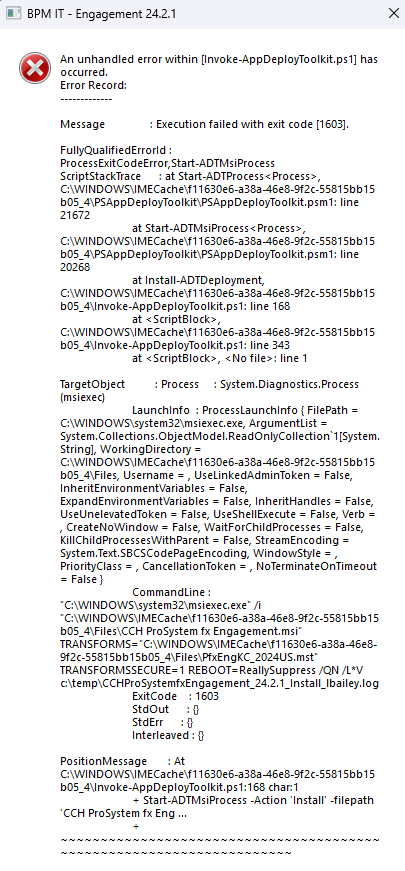
You're deploying yours as a user-based deployment in Intune, right? I have deployed it to a couple of my pcs and it does run, prompts to close out the open apps and then installs. However, when I deploy it to one of my company's regular user pcs, it won't run. One user just sent me this error msg that appeared for her when it tried to run:
All that information you've shown me in that screenshot is the exact info I'm trying to get from you for your Finalization] :: Failure occurred while closing ADTSession for [{Engagement24.2.1}]. Exception calling "Close" with "0" argument(s): "Input string was not in a correct format. Failure to parse near offset 2. Expected an ASCII digit." error that you're receiving.
I feel what's happening is that you're only copy/pasting out the error line from the start of the error message, but what I want is the entire error message as displayed in this screenshot from a log via CMTrace.
We must focus on one thing at a time though. I'd like to work out the Exception calling "Close" with "0" argument(s) exception first, but I truly do need that detailed error information.